Eventscribe Release Notes
August 2026
PLEASE NOTE
This page will be updated throughout the month as new releases are deployed, so check back regularly for the latest updates and improvements.
This month's release may include product updates, new features, enhancements, essential bug fixes, and more.
New
Cadmium Identity Available in Eventscribe Website
Cadmium Identity is a unified authentication platform providing secure and trusted authentication for Cadmium's event and continuing education applications. To learn more about Cadmium Identity, view this article.
Cadmium Identity is now available for Eventscribe Website and will begin rolling out to select events on September 16, 2026. Additional Eventscribe modules will follow, with attendee-facing products first. To learn more about the transition, view this article. (August 4, 2026)
Cadmium Communications in Lead Capture Admin Portal
Cadmium Communications is now available in the Lead Capture Admin Portal, giving event administrators one place to create, personalize, and send email campaigns to the exhibitors at your event — no exporting, no switching tools.
Whether you're sharing access instructions, purchase details, or important reminders, you can reach the right companies in a few clicks.
Here's what you can do:
- Build a campaign in a guided editor. Set your sender, choose which companies receive it, and compose your message in a rich-text editor. A progress indicator keeps you on track from start to send.
- Target the right recipients. Start from a preset list, then customize it from there, so your message goes only to the companies that need it.
- Personalize at scale. Merge tags drop in each company's details, so every message feels tailored.
- Save time with templates. Reuse content across campaigns, and send from a verified address companies recognize.
- Send now or schedule for later. Send right away, or pick a future date and time and let the campaign go out on its own — perfect for lining up reminders well ahead of your deadlines.
- Send with confidence. Autosave protects your work, a test email shows exactly what will land in the inbox, and a final review screen lets you check every detail before you commit.
- See what worked. Once a campaign sends, analytics show how it performed, so your next message is even stronger.
- Send again in a few clicks. Turn a campaign you've already sent into a new, editable draft — reuse what worked, adjust what you need, and send again without rebuilding from scratch.
Clear, timely communication keeps your exhibitors ready and your event running smoothly. Cadmium Communications makes it fast, personal, and integrated directly with the Lead Capture Admin Portal.
Learn more here: Lead Capture Event Organizer Communication Toolkit (August 10, 2026)
Lead Capture Admin Communications – Insert an HTML Block
You can now add custom HTML directly to your message, personalize it with merge tags, and save it in a message template. Learn more. (August 18, 2026)
Lead Capture Admin Portal – Cadmium Fee Column Added to the Transactions and Purchase Items Reports
The Transactions and Purchase Items reports now include a Cadmium Fee (USD) column. For most customers it will be blank, and you can ignore it. It applies only to select accounts, and those accounts have already been notified. (August 18, 2026)
Improvement
Registration – Header Fee Descriptions Now Display in Self-Service
Attendees who had already registered and used self-service to add extra fee items didn't see the descriptions admins added to header rows grouping those fees, even though first-time registrants could see them.
Header rows in the self-service Add Option flow now display their descriptions right alongside the header name, giving already-registered attendees the same information first-time registrants have always had. (August 5, 2026)
Registration – JCB and UnionPay Added to Credit Card Reconciliation Report
The Credit Card Reconciliation report only let you filter by Visa, Mastercard, Amex, and Discover. UnionPay and JCB transactions never appeared, even though they showed up on every other report.
JCB and UnionPay now appear as select-able card types on the report, checked by default for every customer. Transactions made with these cards now show up correctly, with no extra setup required. (August 5, 2026)
We're Upgrading Your Attendee Directory
The Attendee List is moving to the App User List, giving your attendees more control and you less work.
We've decided to consolidate onto the App User List, our modern attendee directory. It's designed to give attendees the tools they want and simplify event management on your end. Your attendees get a better experience. You get your time back. It's a win-win.
Eventscribe Website – Launch Your Website on Your Own Schedule with the New Site Status Setting
Administrators can now control whether their website is Live or in Testing using the Site Status setting. On the Website Settings page, open the General tab, then the Website Setup subtab. The current status is also shown in the System Details section of the website dashboard, where the former Access label has been renamed Login Requirements to better describe the login workflow (Fig. 1). (August 31, 2026)
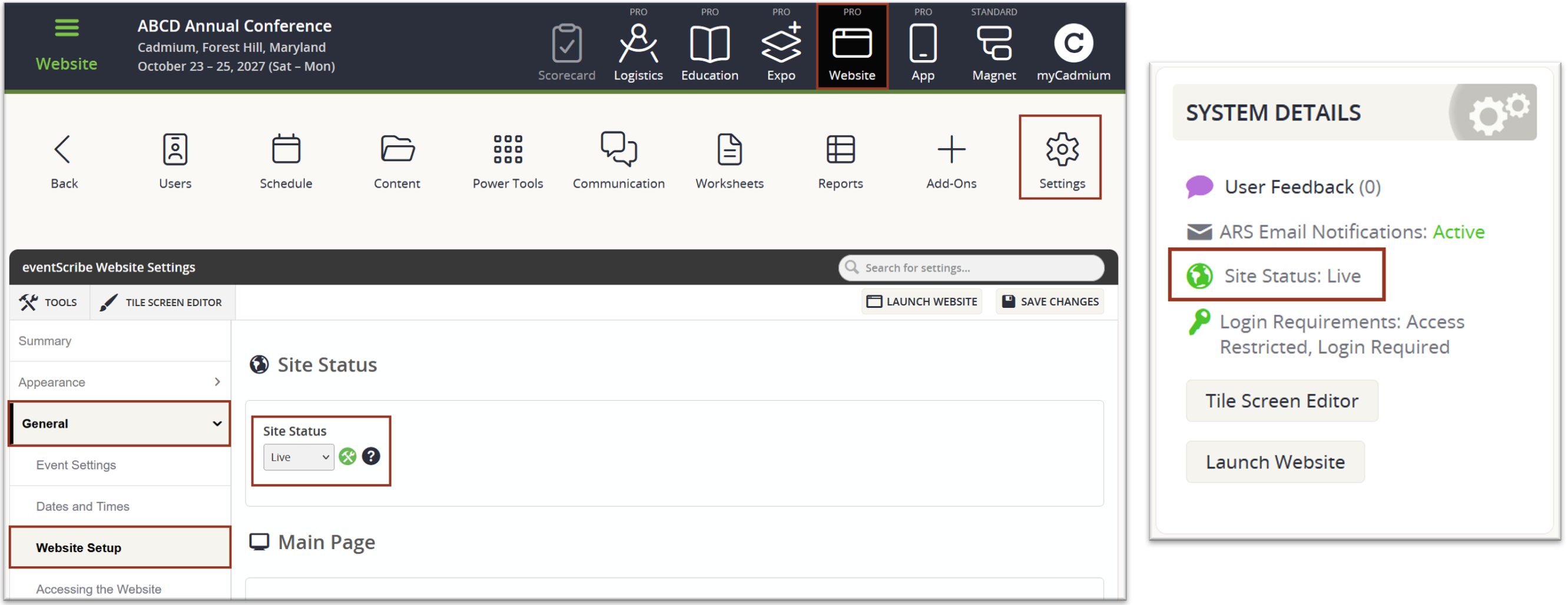
Fig. 1 - Website Settings Page and System Details Section of the Dashboard.
Eventscribe Website – Approve Launch Checkpoint Now Sets Your Site to Live
Completing the Approve Launch checkpoint in the Pre-Launch Prep mission now sets your Site Status to Live, which opens the website to your users. If you are not ready for the site to be available, wait to complete this checkpoint. (August 31, 2026)
Eventscribe Website – More Control Over the Login Page with Cadmium Identity
Events using Cadmium Identity now have a customizable login page for sites where login is required. Visitors who have not yet signed in see this new page. Administrators control the background color behind the login card along with the login header and instructions copy for each event. Users are returned to the page they originally requested after signing in. (August 31, 2026)
Fix
Eventscribe App - 26.07.28 (iOS & Android) – Hide Assets Toggle Now Keeps Its State After a Refresh
We fixed an issue in the iOS & Android apps where the Hide Assets toggle would reset after the screen refreshed, causing assets that had been hidden to reappear. The toggle now retains its setting across refreshes, so hidden assets stay hidden. (August 6, 2026)
Eventscribe Registration – International Characters Now Print Correctly on Badges
An issue was resolved where certain international characters in attendee names, including some Polish and Hungarian letters, did not appear on printed badges with the correct case even though they displayed correctly on screen. This issue has been resolved. Names containing these characters now print accurately on badges. (August 13, 2026)
Education Harvester – Champion Assignments Now Include Newly Added Speakers
When a new speaker was added to a session that already had a Champion assigned, that speaker did not appear in the Champion's speaker list, and administrators had to unassign and reassign the session to restore access. This issue has been resolved. Champions now see the current speakers for their assigned sessions automatically, including task completion totals and the Champion Roster report, with no manual reassignment required. (August 20, 2026)
Expo Harvester – Hotkeys Now Resolve in the Terms & Conditions Task Report
The Terms & Conditions task report now resolves hotkeys the same way the exhibitor-facing task does, so values such as the order summary appear as the exhibitor's actual data instead of raw placeholder text. Organizers can use the report to confirm exactly what each exhibitor agreed to. Hotkeys are resolved at the time the report is generated, so previously captured agreements display correctly as well. (August 21, 2026)
Expo Harvester – Terms & Conditions Hotkeys During the Rental Process
Hotkeys on the Terms & Conditions page shown during the booth Rental Process previously displayed as placeholder text instead of resolving to event and exhibitor information. This has been resolved for the hotkeys whose data is available at this step:
@@@@BANNER@@@@ – event banner
@@@@COMPANYNAME@@@@ – company name
These now display as expected for exhibitors completing a rental. Other hotkeys (such as order summary, invoice, logo, and custom fields) rely on information that isn't finalized until the rental is completed, so they continue to appear as placeholder text on this page. (August 21, 2026)
Education Harvester – Fixed Incorrect Task Reset on Presenter Reassignment/New Assignments
Presenters who completed a filtered presentation-based task sometimes saw it revert to incomplete. This happened even when the task's role, course, track, or build code filter didn't apply to their new assignment.
We updated the task reset logic so it checks every filter type, not just role, before clearing a task's status. Presenters now keep credit for completed work, and admins see accurate completion counts across events. (August 27, 2026)
Education Harvester – Fixed Incorrect Task Reset on Presenter Reassignment/New Assignments
Presenters who completed a filtered upload task sometimes saw it revert to incomplete. This happened even when the task's role, course, track, or build code filter didn't apply to their new assignment.
We updated the task reset logic so it checks every filter type, not just role, before clearing a task's status. Presenters now keep credit for completed work, and admins see accurate completion counts across events. (August 27, 2026)
Education Harvester – Task Achievement Email Sometimes Pulled Hidden Recipients
When generating a task achievement reminder email from a filtered list, occasionally the draft pulled in more recipients than the filter showed, and removing people from the distribution list during the draft process didn't actually take them off it.
The recipient list now matches your filtered results, and anyone you deselect from the distribution list stays off it. (August 28, 2026)
Was this article helpful?
That’s Great!
Thank you for your feedback
Sorry! We couldn't be helpful
Thank you for your feedback
Feedback sent
We appreciate your effort and will try to fix the article