This article gathers Cadmium articles on fee section use and creation and explains the four primary uses of Fee Sections in Cadmium Registration: group discounts creation, controlling purchase quantities, GL codes for reporting, and in program and workshop sales.
Fee Section Uses in Cadmium Registration
Fee Sections are used to group and organize registration fees for four primary purposes: discount and group discount creation, financial reporting, limiting registration fee use, and applying fees to individual programs and workshops. They allow administrators to create logical groupings of related registration fees that can then be tracked and reported on together.
Creating a fee section: See the Fee Sections article.
Limit Discount Usage with Fee Sections
Fee Sections can be used to limit discount usage. When creating a discount, you can choose to apply your discount to a 'Reg Fee Section', which means that your discount will only work with fees that are 'Members' of that fee section.
NOTE
The use of the term 'member' in this article refers to the grouping of fees applied to the Fee Section, not in reference to association members or the Registration Membership module.
- See the Discounts: How to Set Up a Discount help article
- See the Fee Sections help article
Group Discounts
When creating a group discount, i.e. a discount for the purchase of 4 or more registrations, you can select the rates eligible for the group discount with a fee section.
Controlling Purchase Quantity
Within the 'Edit' area of the Fee Section (Fig. 1), admins can control how the member fees are expressed by adding minimum, maximum, or exact quantities registrants are allowed to purchase. This fee section could apply to all fees in the Fee Schedule, or to a specific fee, for instance, if a Guest fee to be purchased must be accompanied by at least 1 registration from the fee section. Admins can set a custom error message when the control criteria are not met.
- The Guest fee in the example below cannot be purchased on its own; it must be added alongside at least one registration from the member fee set in this section. This is controlled by the "Applies to Fee" setting.
If a fee has multiple "Good Until" dates, you will need to create a separate fee section for each date to ensure the correct pricing applies at each deadline.
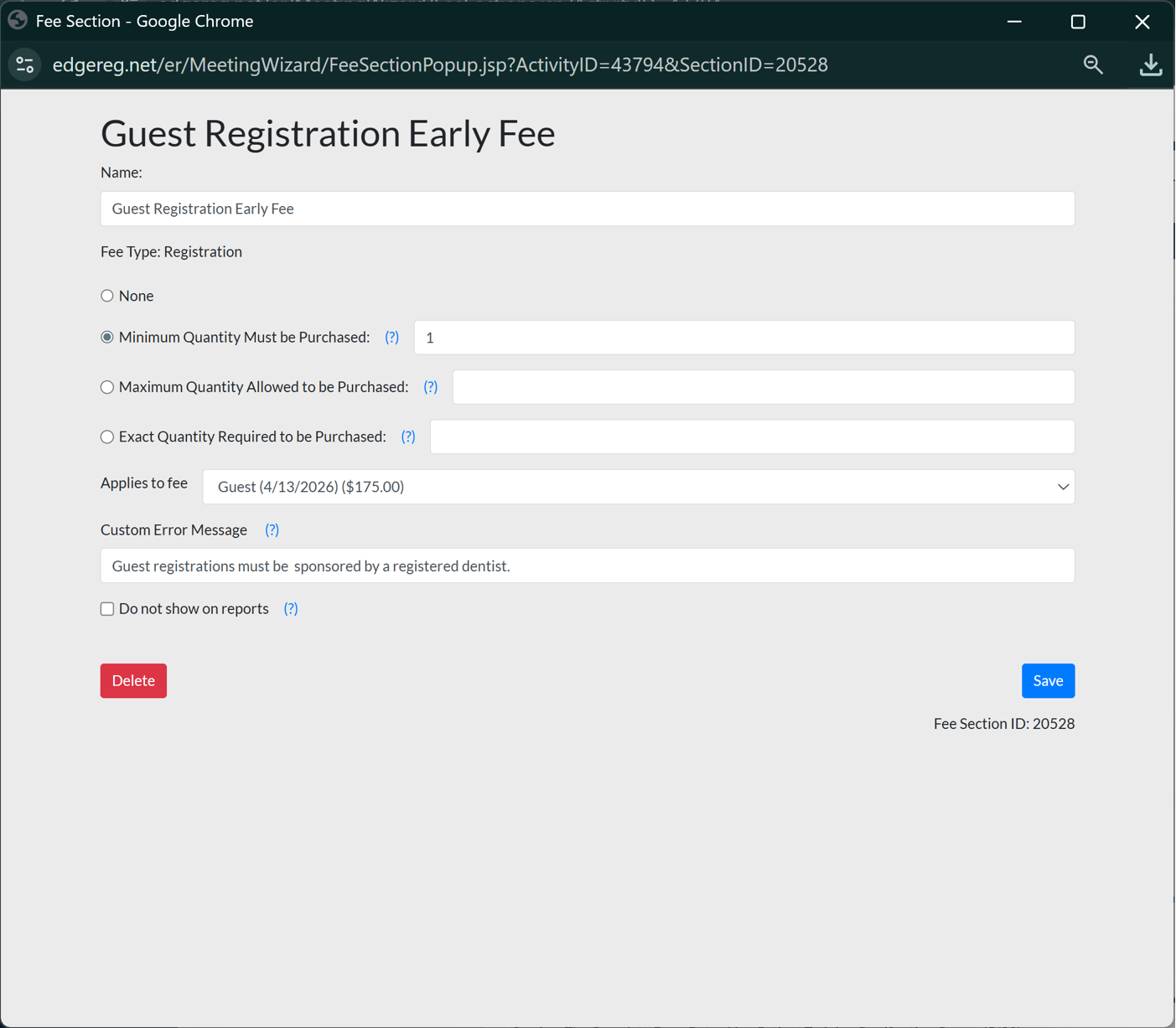
Fig. 1 - Fee Section.
GL Codes for Reporting
Fee sections can be used to put registration fees and option fees into groups for GL code reporting. Enter the GL code as the 'Name' of the fee section and ensure that the 'Do not show on Reports' checkbox is unchecked.
- How to create a GL Code Fee Section
- GL Code Fee Sections without Membership
- GL Code Fee Sections with Membership Included
For Programs & Workshop Sales
Programs and Workshops require a fee section with the workshop Option Fee as a member to apply it for purchase. The fee section is selected on the 'Session' tab within the session 'Edit' popup in the Program and Workshop area of Registration. There you can select the fee section from a dropdown menu for 'Tie purchase of this session to the appropriate fee in this section'.
Was this article helpful?
That’s Great!
Thank you for your feedback
Sorry! We couldn't be helpful
Thank you for your feedback
Feedback sent
We appreciate your effort and will try to fix the article