Eventscribe Release Notes
June 2026
PLEASE NOTE
This page will be updated throughout the month as new releases are deployed, so check back regularly for the latest updates and improvements.
This month's release may include product updates, new features, enhancements, essential bug fixes, and more.
Improvement
Coming Soon! Eventscribe Website & Mobile App – Unique user emails across our products
We're rolling out a series of updates across our integrated suite to better recognize each person as a single, consistent user throughout our system. This work lays the foundation for a range of universal tools — including our new login experience, Cadmium Identity — and it starts with making sure each user has a unique email address within an event for local user management. Beginning with the Eventscribe website and mobile app, you'll see new safeguards that check the existing user list when someone is added, so the same email address won't appear twice in a single event.
These changes will appear gradually across our products over the coming releases. We'll publish specific release notes for each update as it goes live, so be sure to check back here to see what's new.
Lead Capture – Added Help & Info Settings Page for Custom Instructions
Event organizers can now share custom instructions with exhibitors directly in the Lead Capture Exhibitor Portal, even if you're not selling licenses or Developer Kits. We've added a Help & Info settings page where you control what booth admins see, separate from any payment-related terms (Fig. 1).
What's New:
- Refreshed Help & Info settings page in the Admin Portal (renamed from "Contact Information"). Navigate to Lead Capture admin → Settings → Help & Info, where you can still add your support contact details plus custom instructions, terms, policies, or FAQs.
- New License Information and Developer Kit Information sections. Add free-form content for each booth type – there's no length limit. Leave a section blank, and it won't appear to exhibitors.
- Refreshed Help & Info tab in the Exhibitor Portal (renamed from "Support"). Exhibitors see the same resources as before, plus the License or Developer Kit guidance that matches their Lead Capture type.
- Clearer payment settings. The "Terms & Policies" settings are now labeled "Payment Terms & Policies", so it's obvious they only display during checkout.
Why it Matters: If you manually provision Lead Capture for exhibitors rather than having them go through the purchasing flows in the Lead Capture Exhibitor Portal, you now have a dedicated place to communicate instructions and terms. And even if you are selling Lead Capture in the portal, you can use this area to share general information unrelated to payments. (June 1, 2026)
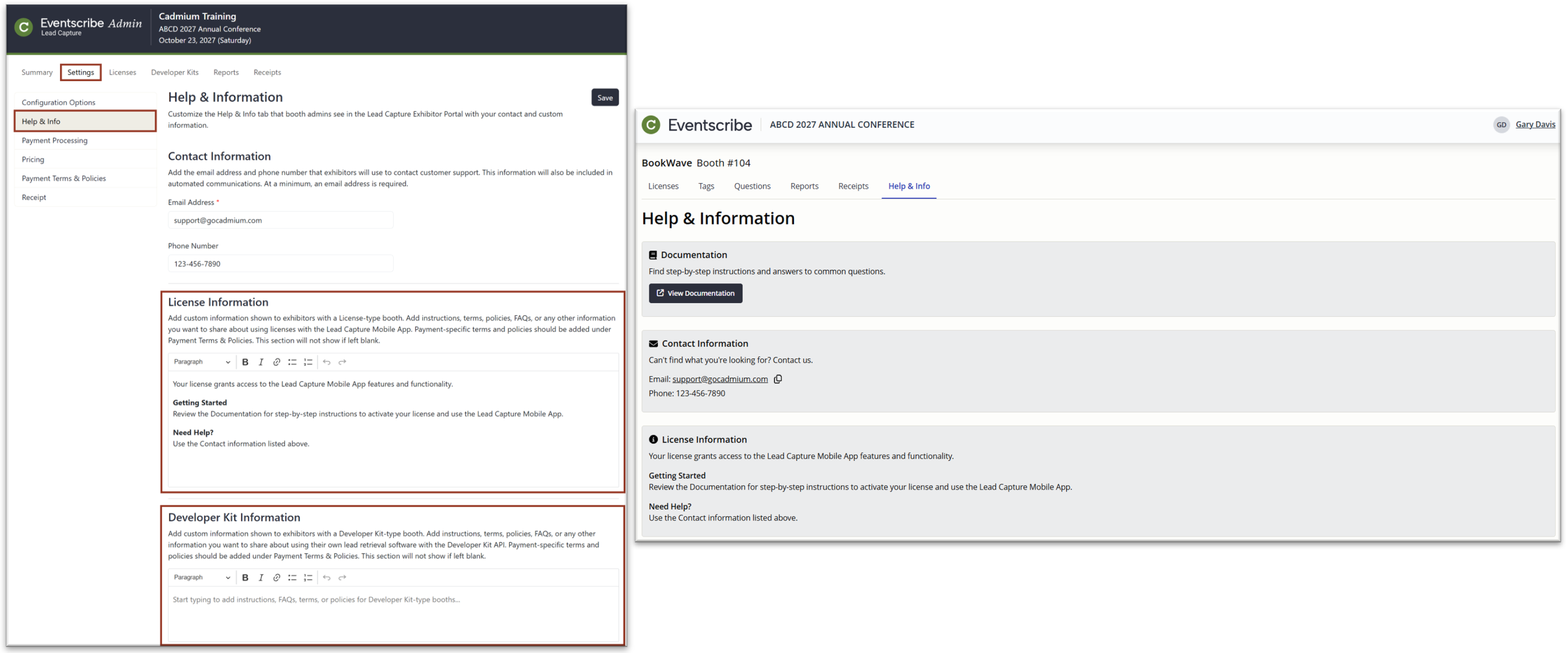
Fig. 1 - Help & Info Section In Admin and Exhibitor Portals.
Eventscribe Onsite – Updated Branding
Onsite now features refreshed Cadmium branding, including updated colors and icons for a more modern, cohesive look. This update aligns Onsite more closely with the broader Cadmium platform and improves visual consistency across products. There are no changes to functionality or workflows; everything works exactly as it did before. (June 4, 2026)
Lead Capture – Unit Price Now Appears on Lead Capture Receipts and Confirmation Emails
We've added a Unit Price to every line item on the Lead Capture order confirmation email and receipt (Fig. 2). Each line now shows the per-unit cost alongside the quantity and total, so the full breakdown is visible at a glance. (June 5, 2026)

Fig. 2 - Unit Price in Confirmation.
Website – Profile Editor Redirect Setting Simplified
We've updated the "Use the User Profile Editor" setting so it controls only whether users are automatically redirected to the Profile Editor, separate from their access to the Profile Editor itself. When enabled, users are directed to the Profile Editor to complete their profile when they create an account. This setting is turned off by default. (June 10, 2026)
Eventscribe Registration – Clear Optional Member Fields with Empty Values
You can now remove data from optional fields in a member record by sending an empty value through the Eventscribe Member API. This makes it easier to correct inaccurate information and honor data-removal requests directly through the API.
What Changed
Previously, when you updated an existing member record, the Member API ignored empty parameters. An empty value did not overwrite existing information, so there was no way to clear an optional field through the API. The only workaround was to send a single space (%20), which set the field to a blank space rather than truly clearing it.
Now, the addMember endpoint treats an empty optional parameter as an instruction to remove the existing value. When you submit a request with an optional field left empty, the API clears that field on the member record.
Why it Matters
Associations need a reliable way to keep member data accurate and to act on requests to delete personal information. This update lets you do both through your existing API workflow, without manual edits or the blank-space workaround.
Example
In the request below, the Salutation parameter is empty. After this update, submitting the request clears the saved Salutation value on the member record:
https://www.edgereg.net/er/API/ERPeople/addMember.jsp?AccountToken=YOUR_TOKEN&Status=0&MemberID=12345&FirstName=John&LastName=Doe&Salutation=&...Things to know
- This behavior applies to optional fields only. Required fields still need a valid value.
- The previous space-value workaround (
%20) is no longer necessary.
(June 10, 2026)
Eventscribe Onsite + Cadmium Identity – Streamlined Account Creation
We've simplified how attendees get started with Eventscribe Onsite. Now, anyone can create a Cadmium Identity account, making the login experience more consistent across Cadmium applications. Eventscribe Onsite still requires the user to have permissions to log in to a particular event. (June 12, 2026)
Fix
Scorecard – Review Assignment Timeout Issues
We resolved an issue that could cause the Review Assignment tool to fail when generating the call to retrieve the review assignment PDF report, particularly when multiple requests were made at the same time or in rapid succession. The root cause was a flaw in how temporary files were named. Under certain timing conditions, the same name could be generated twice, causing the process to fail.
The tool now uses a more robust method for generating unique temporary file names, ensuring that concurrent or back-to-back requests no longer conflict with one another. Report generation should now work reliably regardless of how many requests are made at the same time. (June 3, 2026)
Scorecard – Zip Code Field Adjusting To Improper Format In Payment Form When Using Stripe and Discounts
When was using discount codes in Scorecard and Stripe, the zip code field was auto-adjusting after entering the discount code to a size that didn’t allow for input. This has been fixed and the zip code field no longer changes after saving discount codes. (June 12, 2026).
Lead Capture Mobile App – Double License Activations
We've fixed an issue in the Lead Capture mobile app where tapping the Activate button more than once could activate more than one license. The app now registers a single activation per license, no matter how many times the button is tapped. (June 17, 2026)
Lead Capture – Activating Licenses After Switching Events
We've fixed an issue in the Lead Capture mobile app where switching to a different event and activating a new license could show the wrong event's information or get stuck on the Activating License screen. This was caused by the app holding onto cached data from the previous event. The app now loads the correct event and completes activation each time you switch events. (June 17, 2026)
Eventscribe App - 26.06.16 (iOS) – Universal Search Restored
We addressed an issue that prevented Universal Search from returning results on iOS. Attendees can once again search across sessions, presenters, exhibitors, and more from a single search bar. (June 24, 2026)
Expo Harvester - Category Name Now Wraps On Sales Floor Plan
When categories were enabled in the booth list on the left side of the Sales floor plan, the names were getting cut off when they were longer than 29 characters. This has been fixed and the category text now wraps. (June 26, 2026)
Education Harvester - Phone Number Fields Persisting Special Characters
User and admin phone number fields in the edit user popup retained characters (()-) after the user deleted all input, and triggered validation errors on an apparently empty field. This has now been fixed and when a phone number is deleted, the characters no longer persist. (June 26, 2026)
Eventscribe Registration – MemberSuite Integration Now Maps The Full Street Address
When registrants were brought in through the MemberSuite registration integration, the street address (Address Line 1 and 2) was not carried over, even though City, State, Zip, and Country populated correctly. This issue has been resolved. The full street address now maps from MemberSuite into the Address 1 field, so registrant addresses pull through completely on Member Details and the registration form. (June 29, 2026)
Was this article helpful?
That’s Great!
Thank you for your feedback
Sorry! We couldn't be helpful
Thank you for your feedback
Feedback sent
We appreciate your effort and will try to fix the article