On the Licenses page in the Lead Capture Exhibitor Portal, you can obtain your booth's unique activation code, view available licenses, and track which licenses have been activated by booth staff.
Licenses Page
A banner will display at the top of the page that provides the booth's unique activation code and the number of licenses available.
All licenses associated with a booth will display in the table (Fig. 1). The table includes the following columns:
- License ID: Unique identifier for troubleshooting
- App User: Name and email of the person who activated the license
- Activation Timestamp: Date and time of activation (displays in the event time zone)
- Activation Status: Shows whether the license is Activated or Not Activated. By default, all licenses will display as Not Activated until a booth staff person activates the license
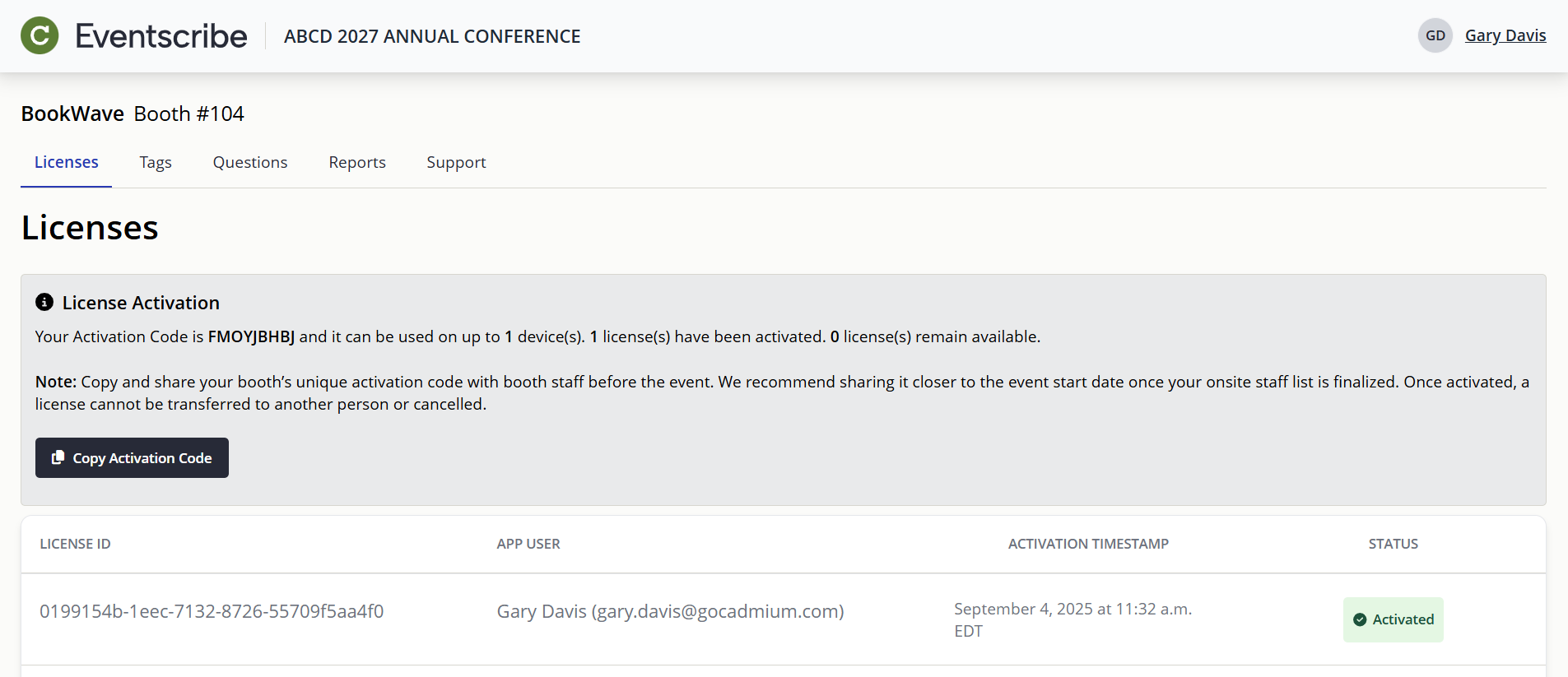
Fig. 1 - Exhibitor Portal Licenses Page.
Sharing the Activation Code with Booth Staff
Each booth receives one unique activation code. This code can be used on as many devices as the booth has licenses. For example, if a booth has five licenses, the same code can activate licenses on five devices.
When the activation code is used on a device, the license becomes associated with the user account logged in on that device. Once activated, a license cannot be transferred to another user or cancelled.
CADMIUM RECOMMENDS
We recommend sharing the activation code with booth staff closer to the event start date once your onsite staff list is finalized. Once activated, a license cannot be transferred to another person or cancelled.
Was this article helpful?
That’s Great!
Thank you for your feedback
Sorry! We couldn't be helpful
Thank you for your feedback
Feedback sent
We appreciate your effort and will try to fix the article