The event organizer can configure custom payment terms and policies that exhibitors must agree to before completing their purchase in the Lead Capture Exhibitor Portal. Navigate to the Payment Terms & Policies tab on the Settings page in the Lead Capture Admin Portal (Fig. 1).
If you do not see this menu item, ensure Configuration Options - Are you selling licenses and/or the Developer Kit to exhibitors? is set to Yes.
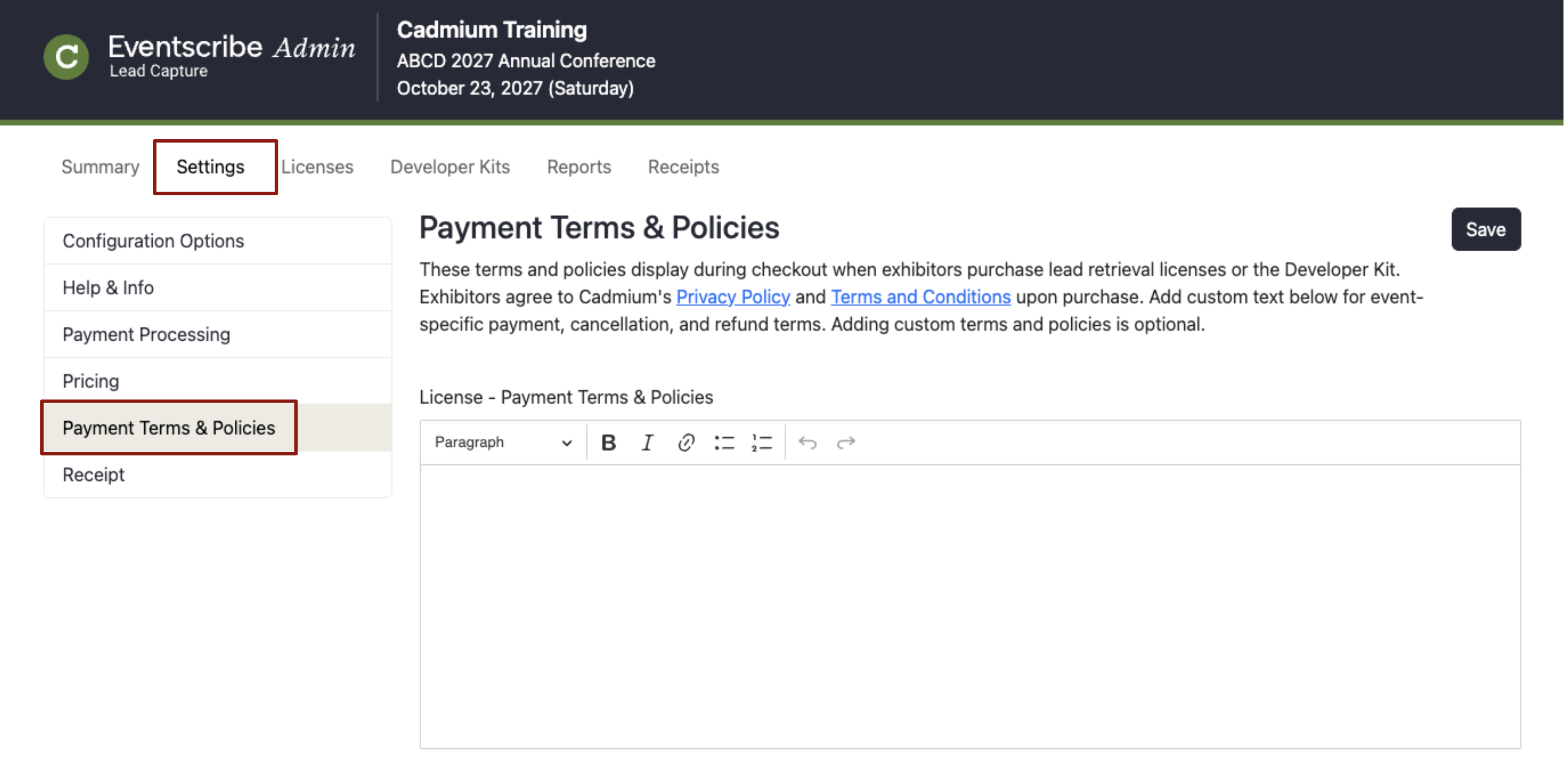
Fig. 1 - Admin Portal Settings Page Terms & Policies Page.
Payment terms and policies are displayed to exhibitors during the checkout process in the Lead Capture Exhibitor Portal. They are also included in the order confirmation email.
Exhibitors automatically agree to Cadmium's Privacy Policy and Terms and Conditions as well as any custom payment terms and policies upon purchase.
Custom payment terms and policies are optional but recommended so you can include event-specific requirements.
Was this article helpful?
That’s Great!
Thank you for your feedback
Sorry! We couldn't be helpful
Thank you for your feedback
Feedback sent
We appreciate your effort and will try to fix the article