Cadmium Payments supports Stripe as an accepted payment processor. To use Stripe within Cadmium Payments, you will need to connect your Stripe account to Cadmium’s Stripe account. Once connected, your Stripe account will be available for use in Cadmium Payments.
To do this, after you add your merchant account in Cadmium Payments and select Stripe as your payment processor follow these steps:
- Select the ‘Connect your Stripe account’ button on the Edit Merchant Account page (Fig 1).
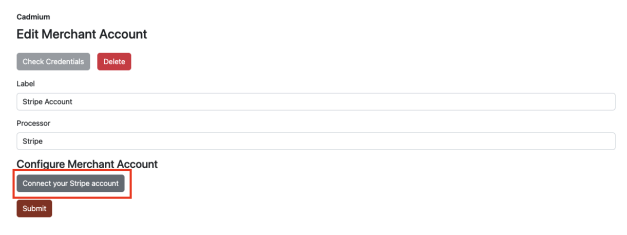
Fig. 1 - Connect your Stripe account
- Login to your existing Stripe account (Fig 2).

Fig. 2 - Login to Stripe
- Once you have successfully logged into your Stripe account, you will return to the Cadmium Payments Edit Merchant Account page (Fig 3). Select Submit to finish configuring your Stripe payment processor.
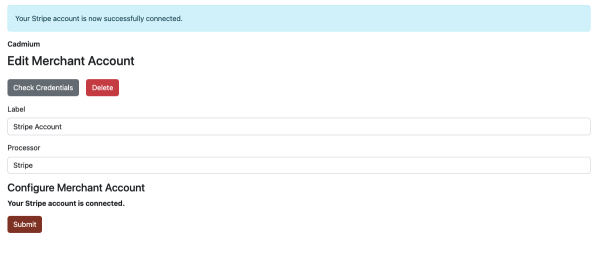
Fig. 3 - Cadmium Payments Edit Merchant Account page
NOTE
If you have multiple Stripe accounts, be sure to select the correct account to be used in Cadmium Payments. For more information on where to find the information needed to connect your Stripe account, please reference the Stripe support documentation.
NOTE
You can configure a Stripe test account in Cadmium Payments to test transactions before you are ready connect your live Stripe account. For more information on how to setup a Stripe test account, please reference the Stripe support documentation.
Was this article helpful?
That’s Great!
Thank you for your feedback
Sorry! We couldn't be helpful
Thank you for your feedback
Feedback sent
We appreciate your effort and will try to fix the article