This article provides new clients with a structured onboarding checklist and a high-level implementation timeline for each project. It is intended to help clients understand when to begin setup for each component, plan ahead, and ensure a smooth and successful launch.
Onboarding Checklist
We recommend all team members who will be working with Cadmium products complete the items below before beginning any project.
- Complete the myCadmium Onboarding Training.
- Complete any relevant product training courses.
- Add operations@gocadmium.com to your safe senders list.
- Designate a team member to take responsibility for each product you’ve purchased by being the primary point of contact.
CADMIUM RECOMMENDS
Each product should have its own primary point of contact, although the same individual may serve as the contact for multiple products.
Get Started Missions
Get Started missions are the initial setup tasks that must be completed to begin working with Cadmium products. Completion of these self-guided missions mark the official beginning of the products’ implementation and notifies your Project Manager you are ready to begin. Get Started missions can be completed in less than 15 minutes and are found in the Missions section of each product's dashboard.
The primary point of contact(s) should complete each product’s self-guided Get Started mission at least three months before the product’s launch date.
IMPORTANT NOTE
The launch date is when the product becomes accessible to end users. For example, if you’ve purchased the Education Harvester for your event, the launch date is when the Speaker Portal opens to collect bios, headshots, agreements, and other materials.
Additional tips to set yourself up for success
- Order graphics from your marketing department early. Graphic requirements can be found in the corresponding self-guided mission within each product.
- Submit a boomerang to request domain authentication after reviewing this Help Tip.
- Take advantage of our Boomerang system to ask questions. You have a whole team to support you!
When to get started
Use the attached chart to record the primary point of contact for each product and to establish configuration timelines (Fig 1). Begin by identifying your target launch date, then ensure the Get Started mission is completed at least three months beforehand.
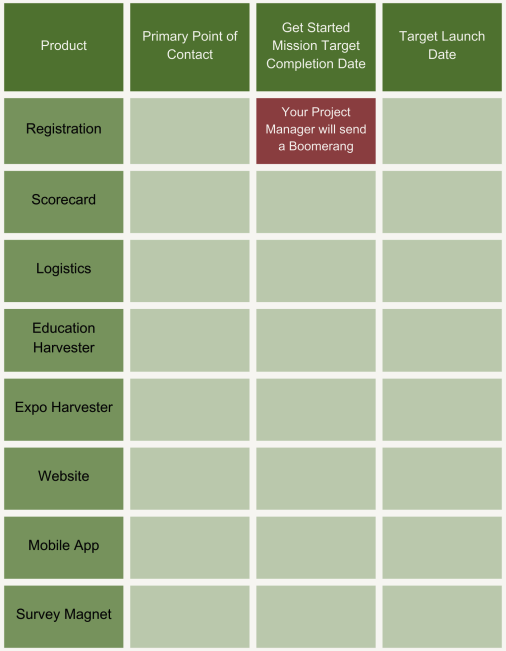
Fig. 1 - primary point of contact chart
Was this article helpful?
That’s Great!
Thank you for your feedback
Sorry! We couldn't be helpful
Thank you for your feedback
Feedback sent
We appreciate your effort and will try to fix the article