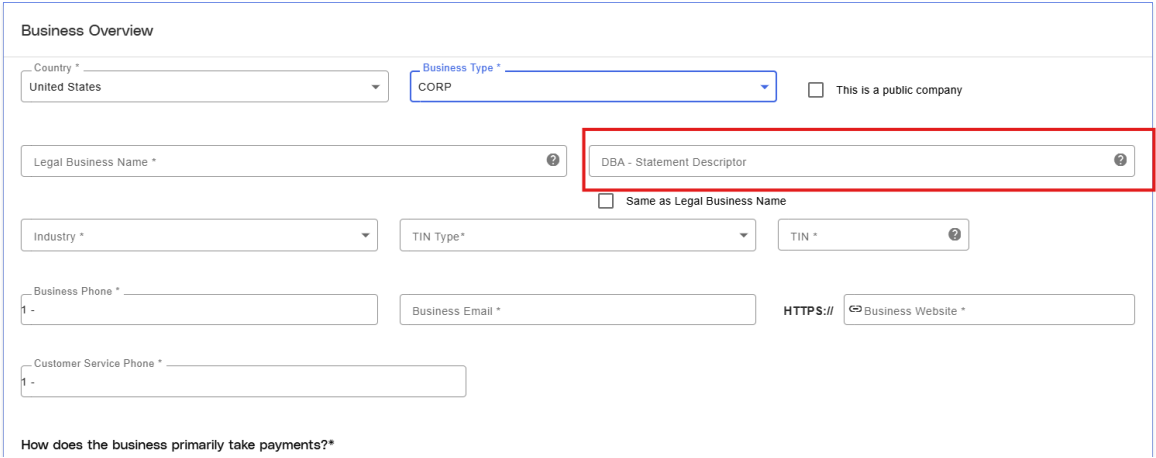
- Within the Merchant Application, set the ‘DBA – Statement Descriptor’ field to the company name that you want to appear on your customers’ credit card statements and receipts.
This article explains how to update your merchant's statement descriptor (DBA), which determines how your business name appears on customers' credit card statements and receipts.
As a merchant, you can change how your company name appears on a customer’s credit card statements and receipts by updating the Statement Descriptor or DBA – Statement Descriptor fields in your account profile.
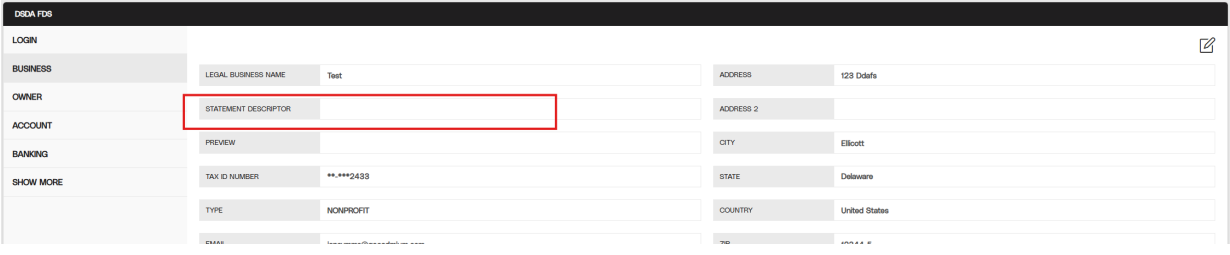
- Following approval of your merchant application, within the Cadmium Pay portal, this field can be seen in the Profile section on the Business Tab in a field labeled ‘Statement Descriptor’. If you’d like to modify the Statement Descriptor for your account, please submit a support ticket so the Cadmium team can assist.
Last modified Aug 03, 2026
Was this article helpful?
That’s Great!
Thank you for your feedback
Sorry! We couldn't be helpful
Thank you for your feedback
Feedback sent
We appreciate your effort and will try to fix the article